Free radio automation for Windows
Your studio.
Your control.
RadioMaster runs your station from one screen: playlists with live start times, hour markers that keep you on the clock, smart crossfades, Icecast and Shoutcast streaming, and full AzuraCast station management.
Windows 10 and 11 · 64-bit · MIT licensed · no account or subscription
What's on the desk
Everything a live studio needs
Built for stations that run around the clock and for presenters who jump in live.
As many as you need
Playlist tabs side by side. The one marked ▶ is on air; play any row of another tab and it goes to air. Every row shows its projected start time.
Hour markers
Wait for the top of the hour, finish the song and jump, or cut in exactly on time. The clock counts down to the next marker.
Smart fading
Each track is analysed: silence is trimmed, cold endings get a tight mix, fade-outs overlap. Fine-tune any song in the waveform track editor.
Fill every screen
One, two or three panels in the main window, plus as many Additional windows as you like for a second or third monitor.
Icecast and Shoutcast
Several encoders at once with automatic reconnect and track titles, plus multiple sound-card outputs for FM and monitors.
Built for live shows
Cart wall for jingles, microphone with music ducking, recorded voice tracks, a notepad for scripts, and a log of everything that played.
Running order
More than songs in a list
The Playlist menu adds rows that do things. Put them anywhere in the running order and RadioMaster handles them when they come up.
| Item | What it does | Key |
|---|---|---|
| URL | Relays an internet stream for a set time or until Next | Alt+U |
| Line input | Puts the studio input or a remote feed to air | |
| Command | VOLUME 80, ENCODER START 1, PLAYLIST Evening, RUN a program | Alt+C |
| Timed pause | Silence for an exact length | Ctrl+P |
| Teaser | Faded snippets of the next few songs | |
| Time announcement | Your recorded H00–H23 and M00–M59 files, or a speech voice reading "It's 4:15 PM" | |
| Container | Several files as one row, played in order or one at random | |
| Track list | One random song from a folder, skipping recent tracks and artists | |
| Voice track | Insert a recording or record one straight into the playlist | Ctrl+R |
| Comment | A note for the presenter; nothing plays | Alt+W |
Screens
See it running
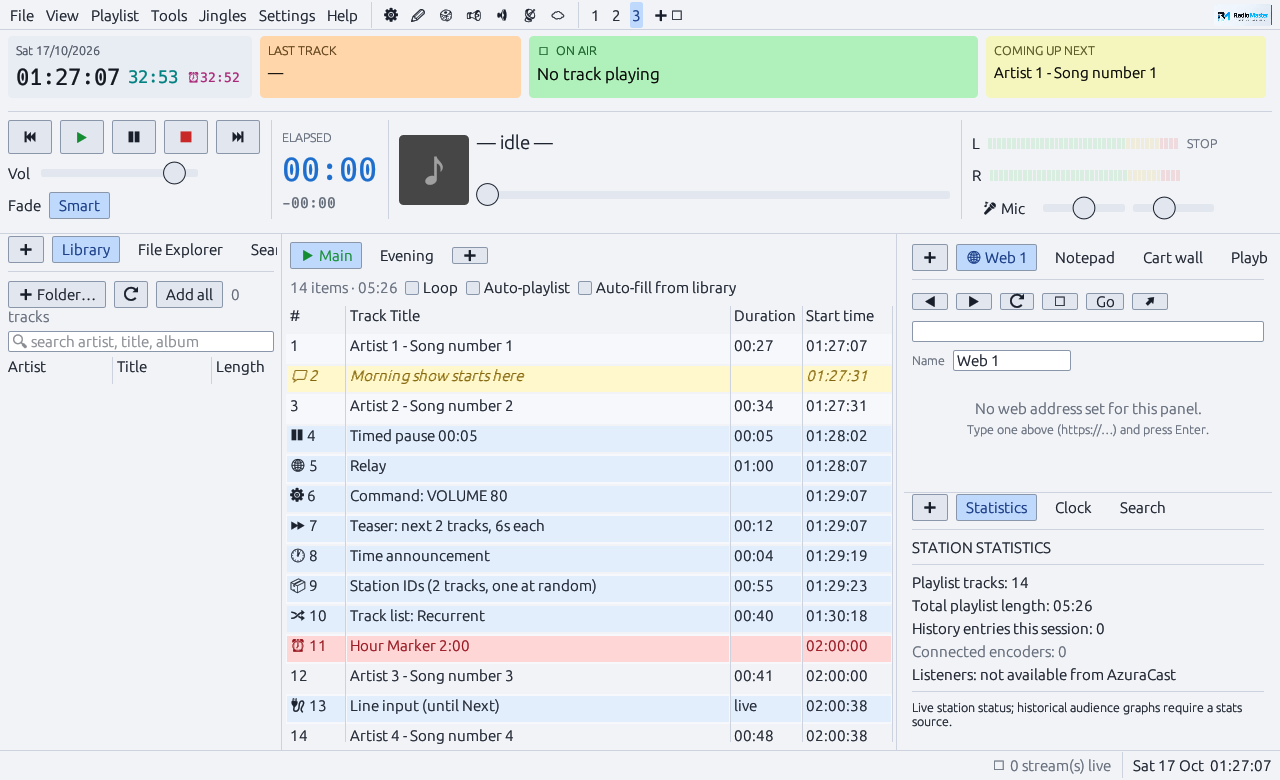
The main window: playlist tabs with start times in the centre, library on the left, panels on the right.
AzuraCast
Manage the station without leaving the studio
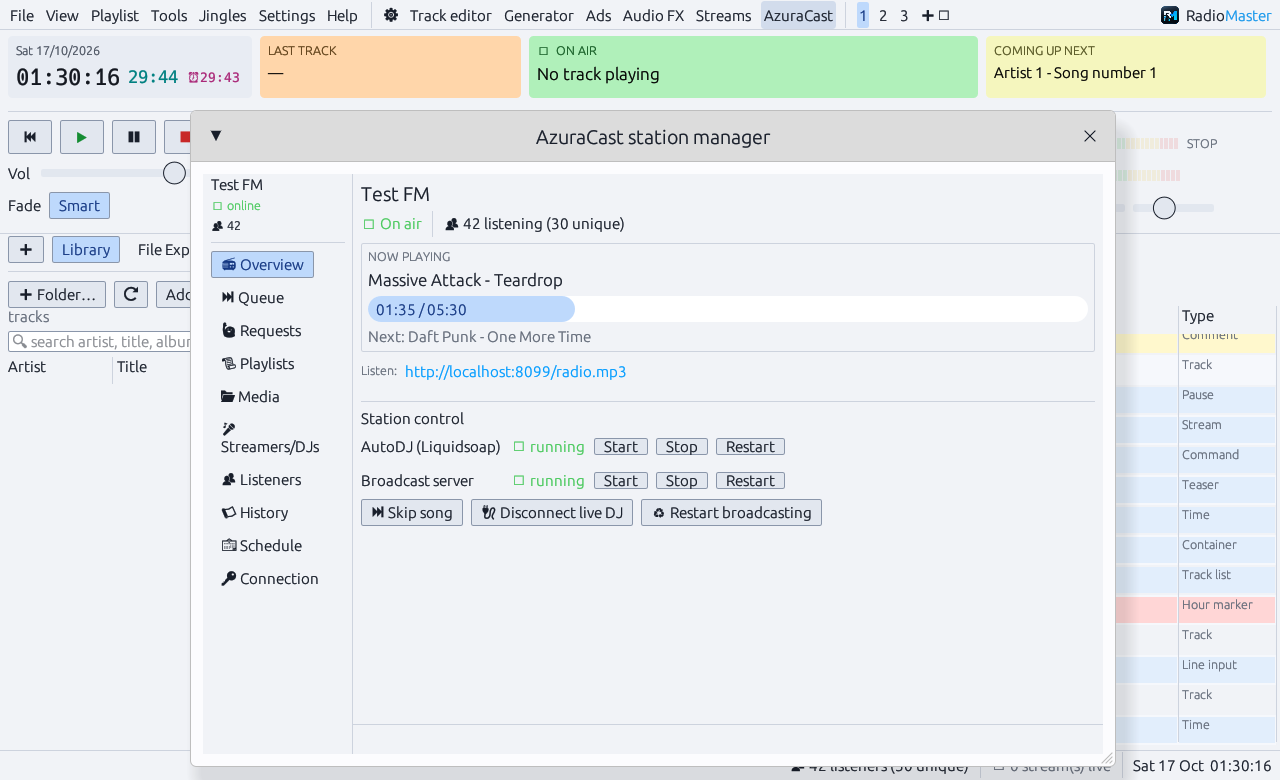
Point RadioMaster at your AzuraCast server to see what's playing and who's listening. Add an API key and run the station from the same window.
- ServicesStart, stop or restart AutoDJ and the broadcast server, skip songs, disconnect a live DJ
- QueueSee what AutoDJ plays next and remove songs
- RequestsListener requests, cleared or added to your local playlist in one click
- MediaBrowse folders, upload files, queue a song next
- StreamersAdd and edit DJ accounts, then fill an encoder with their login
- ReportsLive listeners, song history and the station schedule
Optional. Without a server RadioMaster streams to any Icecast or Shoutcast host.
Download
Get on air
Free and open source. Pick the installer, or the portable zip if you'd rather keep everything in one folder.
Installer
RadioMaster-Setup-<version>.exe
Start-menu and desktop shortcuts plus an uninstaller. Install for just you without an admin password, or for everyone on the PC.
Download installerPortable
RadioMaster-<version>-windows-x64.zip
Unzip anywhere, including a USB stick, and run RadioMaster.exe. Settings live in your AppData folder either way.
Download zipFrom source
Needs the Rust toolchain. Linux builds work too.
git clone https://github.com/epell-development/RadioMaster
cd RadioMaster
cargo run --release